 Sempere
Advanced
The web viewer
Read a vault in a browser, on any computer, with the key that never leaves the page.
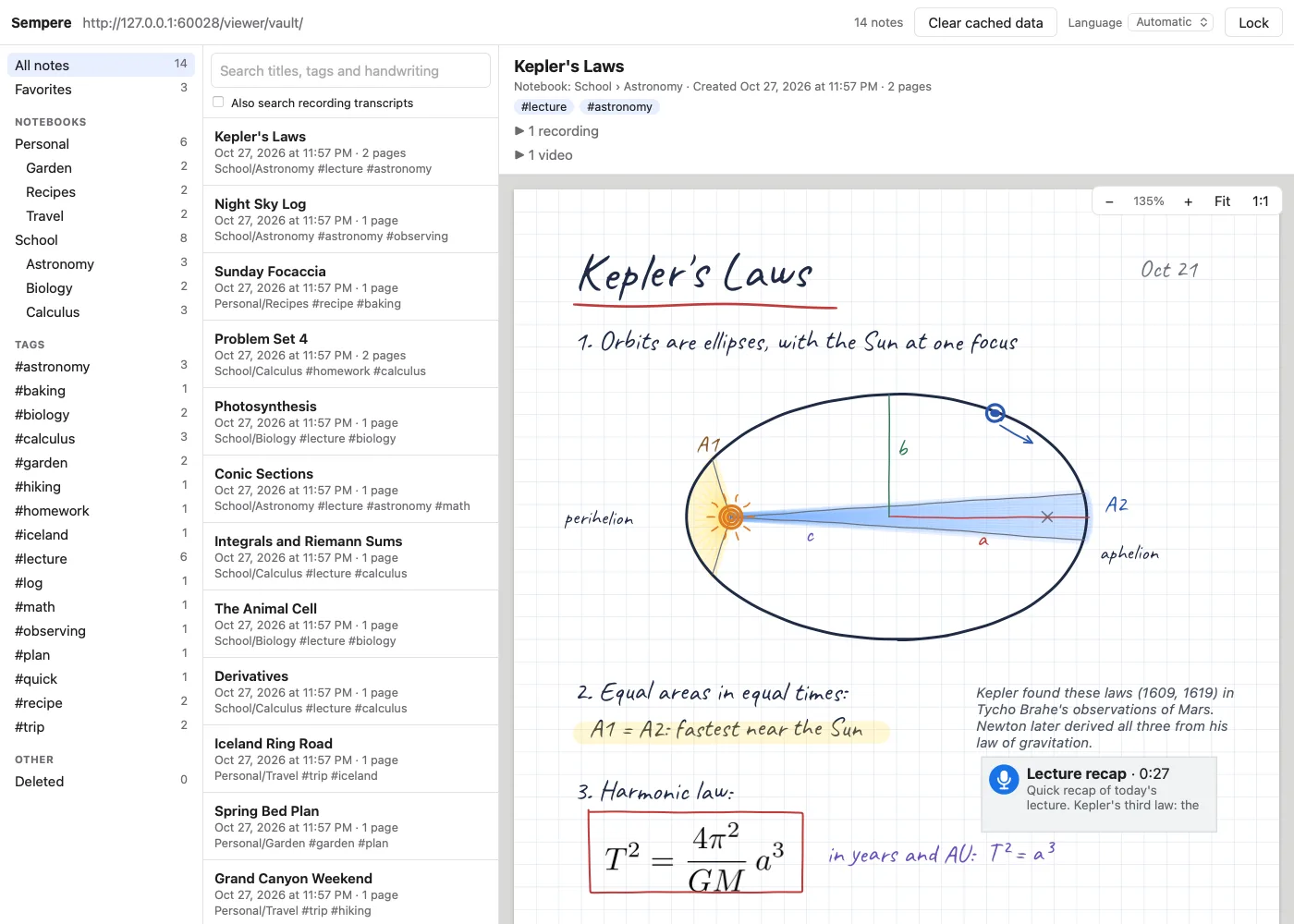
The web viewer is a read-only Sempere that runs in your browser. It opens a vault, decrypts it in the page with your key, and shows your notes the way the app draws them: ink, paper, pictures, text boxes, PDFs, equations and recordings. Nothing is sent anywhere; the page has no server side.
Try it on the live demo, which opens a sample vault with a public key.
What it does
- Browse notebooks, tags, favorites and deleted notes.
- Search titles, tags, notebooks and recognized handwriting (and transcripts, if you turn that on), and jump to the page.
#wordsearches tags only. - Read notes with pan and zoom; play recordings with their transcripts.
It does not edit, restore versions or export. An equation without a stored rendering shows its LaTeX source; HEIC images show as placeholders.
Open a vault
- A folder on your computer: “Open a vault folder…”, or drop the vault’s folder (a sync-target folder or a copy of the vault) on the page. In Chrome and Edge the folder is read as needed; in Safari and Firefox every file is read first, so a large vault is quicker from a URL. With iCloud Drive, download the vault fully first.
- A URL: a WebDAV share, or a vault on a plain web server. A plain server cannot list folders, so run
sempere vault indexthere once (other CLI commands keep the index current).
Unlock
Use the recovery key: paste its AGE-SECRET-KEY-PQ-1… line (from the printed recovery kit) or the whole key file, or choose the file with Choose a key file…. If the vault keeps a passphrase copy of its recovery key, or you have a passphrase-locked recovery kit (paste its text, or choose its .key.age file), type the passphrase instead; deriving the key from it takes a few seconds and up to 1 GiB of memory. A key file made by the sempere command-line tool for a device that joined the vault also works. The keys the apps keep on your iPad, iPhone and Mac never leave those devices, so they cannot be pasted here. The key stays in the page’s memory only, and a passphrase is used once and never stored; Lock reloads the page and forgets them.
Optionally, the viewer can remember the key (Remember this key on this device with a passkey, off by default) behind a passkey (Face ID, Touch ID or a security key) in that browser. The key is stored encrypted, bound to that vault’s location. It needs HTTPS and a browser and passkey provider with the PRF extension, such as current Chrome or Edge, or Safari 18 or later with iCloud Keychain.
Host your own
The viewer is as trustworthy as whoever serves its files, because they could change the page. For your own vaults, serve it from a host you control:
git clone https://github.com/anthonytw/sempere
cd sempere/web && npm ci && npm run build      # Node 22.12 or later; output in web/dist/
Serve web/dist/ over HTTPS. Simplest is one origin for the viewer and the vault (for example https://notes.example.org/ and https://notes.example.org/vault/). A config.json next to index.html can open one vault directly:
{ "vault": "./vault/", "listing": "auto", "allowOtherVaults": false }
To keep the hosted vault up to date from your computer, mirror it with the CLI:
SEMPERE_WEBDAV_PASSWORD=… sempere sync webdav https://notes.example.org/vault/ \
  --vault ~/Notes.sempere --user notes --identity ~/.config/sempere/key.txt --push-only --web-viewer
--web-viewer also publishes the encrypted summaries that make the list load fast. A complete server configuration (Caddy, with WebDAV, a login and the right security headers) is in docs/web-viewer.md.
Privacy in the browser
The viewer caches encrypted files (never decrypted ones) in the browser’s storage, up to 512 MB; Clear cached data removes them. For sensitive vaults, use a browser profile without extensions: an extension can read any page.